
You have just finished a clean install of Windows. The desktop looks fresh, everything feels fast, and then you notice the Wi-Fi icon is missing. There is no network to join, no driver to switch on, and no way to get online from that computer to fix the very thing stopping you getting online.
Or the slower version sneaks up on you. A laptop that ran fine for two years starts behaving strangely: brightness keys stop responding, sound crackles and disappears, a USB drive needs unplugging three times before it is recognised. Nothing has broken dramatically. The software that lets Windows talk to the hardware is out of date or missing, and Windows Update never filled the gaps. What fixed both situations for me was a small free tool, kept ready like a first-aid kit, that could look at the whole computer at once and say what was missing.
Snappy Driver Installer Origin: A Rescue Kit for Missing Drivers
A driver is a translator. Your Wi-Fi card, graphics chip, sound hardware, and the controller behind your keyboard shortcuts speak their own language, and Windows speaks another. When the translator is absent or out of date, the conversation breaks down in odd, specific ways: Wi-Fi vanishes, brightness keys do nothing, audio stutters, a Samsung SSD runs without the controller software it needs. The hardware is usually fine. The translator needs installing, or updating.
Snappy Driver Installer Origin, usually shortened to SDIO, is a free, open-source tool that scans a Windows computer, compares what it finds against a large collection of driver packs, and lists everything missing or outdated. Then it downloads and installs only the drivers you choose. There is no installer: download a small zip file, extract it, and run the program from the folder. It works on Windows XP, 7, 8, 8.1, 10, and 11, which is why it earns a place in a rescue kit.
This matters more now than it did a few years ago. Windows Update delivers many drivers, but not all of them, and Windows 10 no longer gets the steady stream of updates it once did. A fresh install can leave you with a working desktop and a silent network card. The kit idea is simple: keep the tool ready on a USB stick. In the video, four drivers came to roughly 1 GB, on a computer already kept updated. On a fresh install, expect more.
The Three Choices Inside the Kit, and Which One to Pick
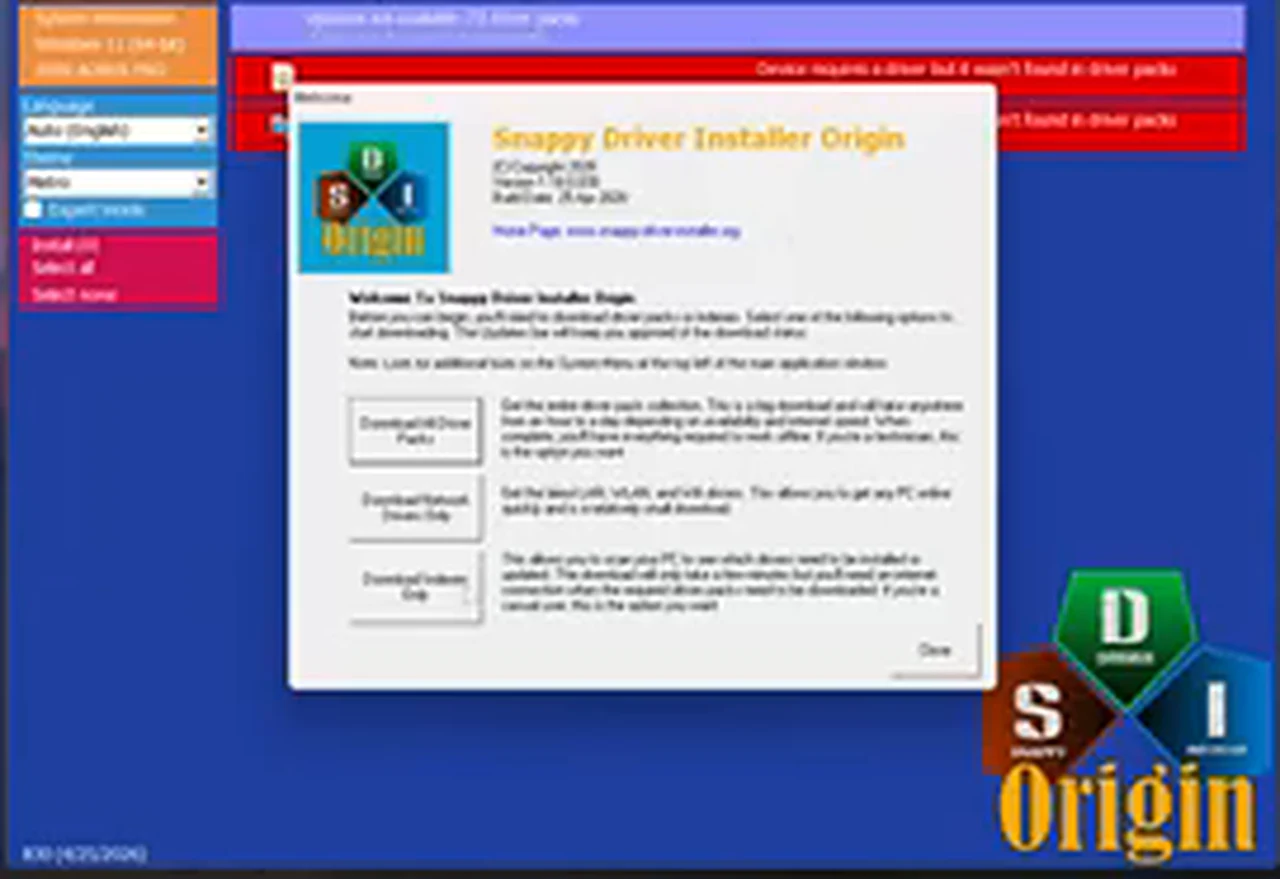
When SDIO first opens, it asks how much you want to download. The three options suit three different jobs, and grabbing everything is the mistake most people make here.
That distinction matters, because the word offline gets used too loosely with tools like this. The full packs, once downloaded, really can work without an internet connection. The everyday method cannot: it needs the internet to fetch the index and then the drivers you select. If your Wi-Fi driver is missing, you still need a way online first, such as a LAN cable, phone USB tethering, or a second computer. The kit does not remove that first step.
One Word Changes Everything: Get “Origin” Right
Here is the trap the video warns about twice. Two tools share almost the same name, the same logo, and the same job description. Only one is free in the way this guide describes. The one you want is Snappy Driver Installer Origin, with Origin at the end. Leave that word out, and you land on the other Snappy Driver Installer, which will not let you update drivers for free in the same way. Search the full name and open the official project page, which the program itself lists as snappydriverinstaller.org. If a result promises a cracked copy or asks for payment before scanning, you are in the wrong place.

SDIO is also not Intel Driver & Support Assistant, Intel’s own updater, which only handles Intel hardware. SDIO looks at the whole computer, whatever brands are inside it.
Before You Open the Kit: Five Minutes of Preparation
Plug the laptop in and save open work first. I once updated a graphics driver on battery power and watched the screen go black. The lesson stuck. Then run through this list.
Using the Kit: The Walkthrough
Step 1: Download the small zip file from the official page
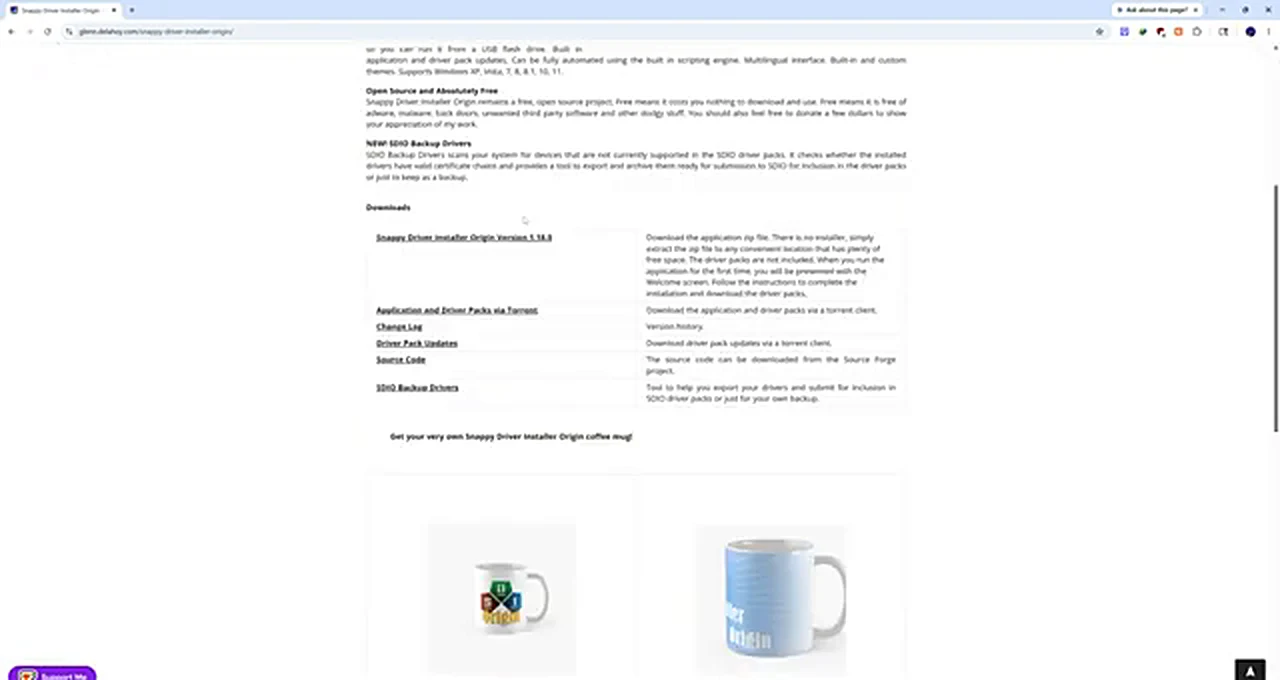
On the official project page, find the Downloads section. The entry shown in the video is Snappy Driver Installer Origin Version 1.18.0, and the download is a small zip file. There is no installer: extract the zip, and the welcome screen walks you through downloading the driver packs or indexes. Save a copy on the USB stick too.
Step 2: Extract the zip and run the right executable
Right-click the zip file and extract it. Inside the folder you will see SDIO_x64. Double-click it on a 64-bit computer, or use the other executable on a 32-bit computer. Windows will ask for permission; click Yes. The program installs nothing. It simply opens, which is why it can live on a USB stick and be carried to another computer.
Step 3: Accept the welcome screen and choose indexes only
The first window shows the SDIO logo and the three download choices. Read it once, slowly, because the buttons look similar and the choice matters. For a single computer with an internet connection, choose Download indexes only. The program connects, downloads the index files, and checks your hardware. Leave it alone while it works.
Step 4: Read the list before you tick anything
When the scan finishes, SDIO lists drivers with a checkbox beside each one. In the video, the list is short: an Intel HID Event Filter driver missing entirely, a Samsung NVMe Controller driver for the Samsung SSD, an Intel power and temperature instrumentation driver, and an Intel watchdog timer driver. One entry sits apart in red, marked as a device whose driver was not found in the packs. That red row is not an error. It is the program telling you honestly that it has no driver for that device.
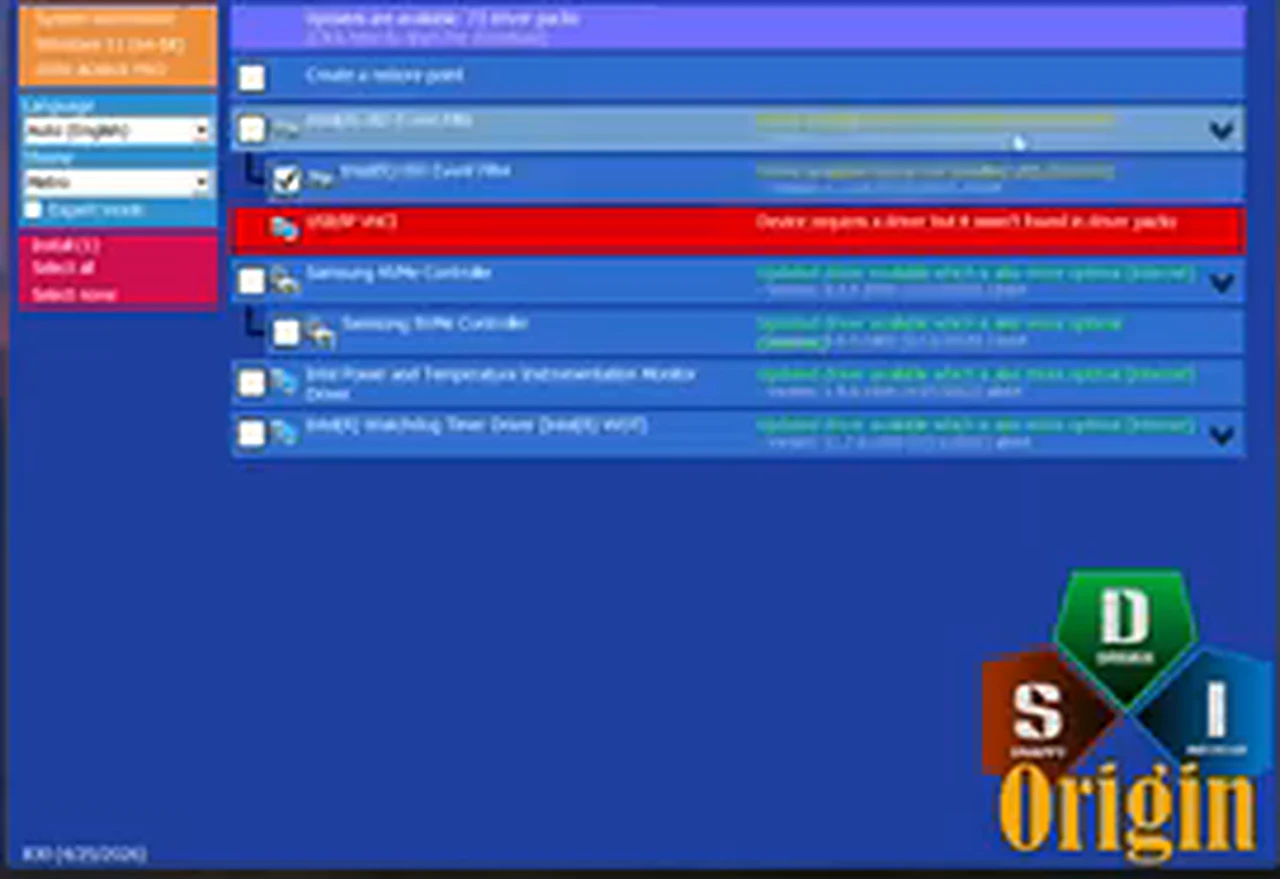
Tick the drivers marked missing or outdated that match hardware you recognise. If a name means nothing to you, search for it first, as the video advises. Thirty seconds of checking beats installing something blindly. Make sure the restore point option is ticked, then click Install.
Step 5: Wait for the install, then restart properly
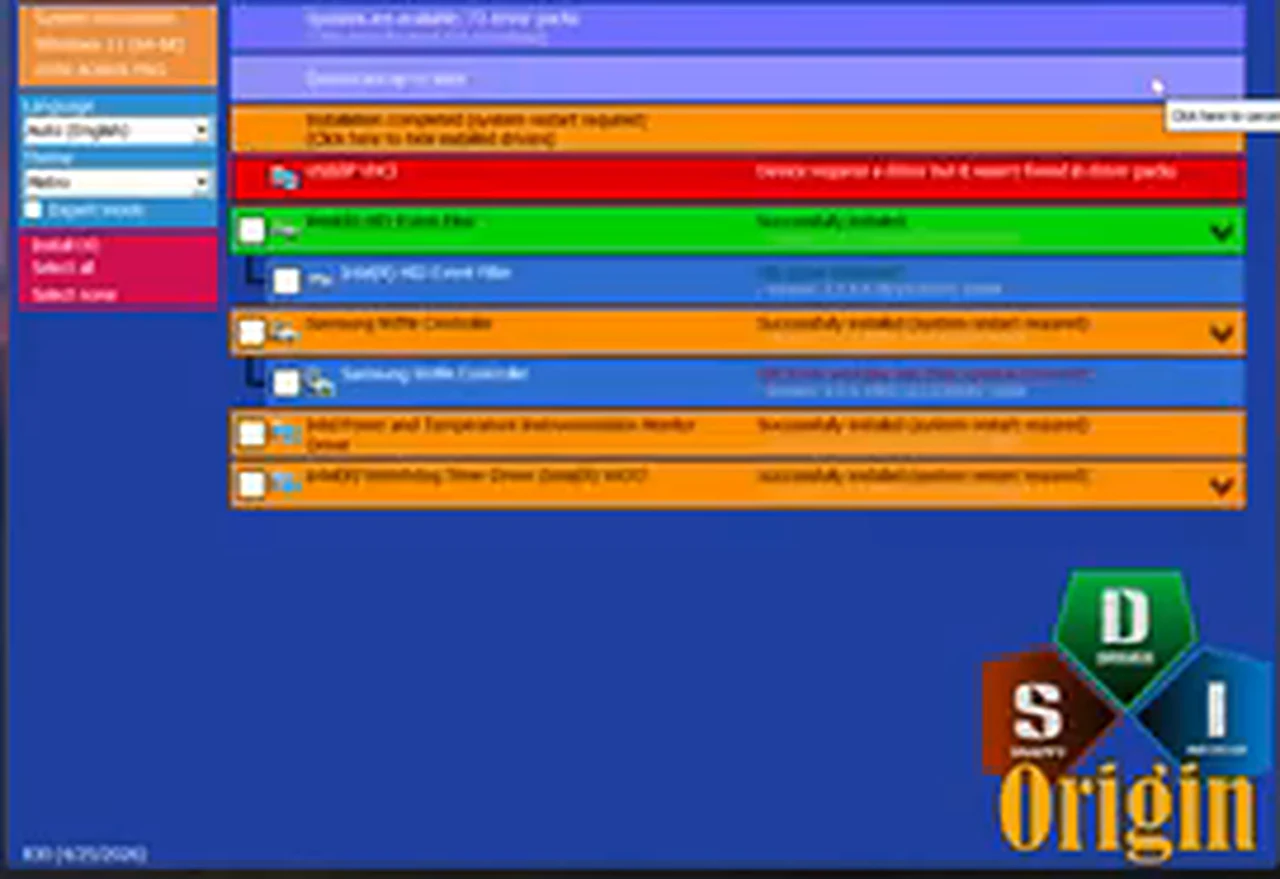
SDIO downloads the drivers you selected and installs them one at a time. In the video, four drivers install, and each row changes colour as it completes. The first finishes with a plain success message, while the others report success but need a system restart. That difference is normal: most important drivers only take effect after a restart. When the install finishes, restart from the Start menu. Do not just close the lid or put the computer to sleep.
After the Restart: The Five-Minute Check
Go through the list you wrote down, one item at a time. Can you join the Wi-Fi network? Does sound play cleanly? Do the brightness and volume keys respond? Does the USB drive appear the first time you plug it in? Then open Device Manager by right-clicking the Start button and look for a yellow warning triangle beside any device. A clean Device Manager is the quiet confirmation that the kit did its job. If anything misbehaves, use the restore point: type recovery into Windows search, open the recovery options, and restore to the point created before the install.
When the Kit Cannot Finish the Job
When SDIO says a driver was not found in the packs, believe it. That device needs a driver from its own manufacturer, usually from the support page for your exact laptop or motherboard model. Graphics drivers are the other exception: SDIO can update them, but for gaming or video editing, the newest driver from NVIDIA, AMD, or Intel directly is usually better. Use SDIO to get the computer working, then check the graphics manufacturer’s own updater. And remember the catch that started this guide: with no network connection at all, and no LAN cable, phone tethering, or second computer, SDIO cannot fetch the drivers it needs. That is why the kit belongs on a USB stick before the emergency.
If your machine runs on Intel hardware, Intel’s own Driver & Support Assistant is another easy way to keep drivers updated — it checks Intel parts directly and installs only what matches.
Frequently Asked Questions
Is Snappy Driver Installer Origin really free?
Yes. It is a free, open-source project, and the project page states that plainly: free to download and use, with no adware, malware, or unwanted bundled software. The confusion comes from the similarly named tool without Origin in its name. Download only the Origin edition, from the official project page.
Can I use it without the internet?
Only if the full driver packs have already been downloaded. The normal method, downloading indexes only, needs an internet connection. If you have no connection, get online first with a LAN cable or phone USB tethering, or run SDIO from a second computer and carry the drivers over on a USB stick. The full packs are the truly offline route, but they are close to 50 GB and meant for people who service many computers.
Will it work on Windows 10?
Yes, and Windows 10 is one of the places it helps most, because Windows 10 no longer receives the regular updates it once did. SDIO supports Windows XP, 7, 8, 8.1, 10, and 11, so it covers both the old laptop in the cupboard and the current desktop.
Should I install every driver it offers?
No. Install the ones marked missing or outdated for hardware you recognise, and check any unfamiliar name with a quick search first. Install in one careful pass, restart, and test before going back for anything else.
Is it better than Windows Update or the Intel updater?
They do different jobs, so use them together. Windows Update handles Windows itself and many common drivers, and it should stay enabled. The Intel updater handles Intel hardware only. SDIO handles the whole computer at once, including drivers Windows Update never offers, which is why it finds things the other two miss.
That is the whole kit, and it fits in a folder smaller than a single movie. Keep SDIO on a USB stick, remember the word Origin, choose indexes only for a single computer, let it create a restore point, and restart when it asks. The next time a fresh install leaves you with no Wi-Fi, you will be opening a kit you already prepared.